Sign up today and unlock up to $10,000 bonuses Get Now →
For the complete documentation index, see llms.txt. This page is also available as Markdown.

1️⃣How to Deposit

Fund your 1 Trade Market account from your Wallet in minutes with a crypto deposit, bank wire transfer, or credit or debit card.

Adding funds to your 1 Trade Market account takes only a couple of minutes. Open your Wallet from the top navigation and select the Deposit tab to get started.

1. Choose how to add funds

The Deposit tab gives you three ways to fund your account. Pick the one that suits you:

The three 1 Trade Market deposit options: Crypto Deposit, Bank Wire Transfer and Credit or Debit Card
  • Crypto Deposit send coins from an external wallet. This is the recommended option and carries no platform fee.
  • Bank Wire Transfer fund your account through one of our trusted exchange partners.
  • Credit or Debit Card buy crypto instantly with Visa, Mastercard or American Express.

2. Choose your asset and network
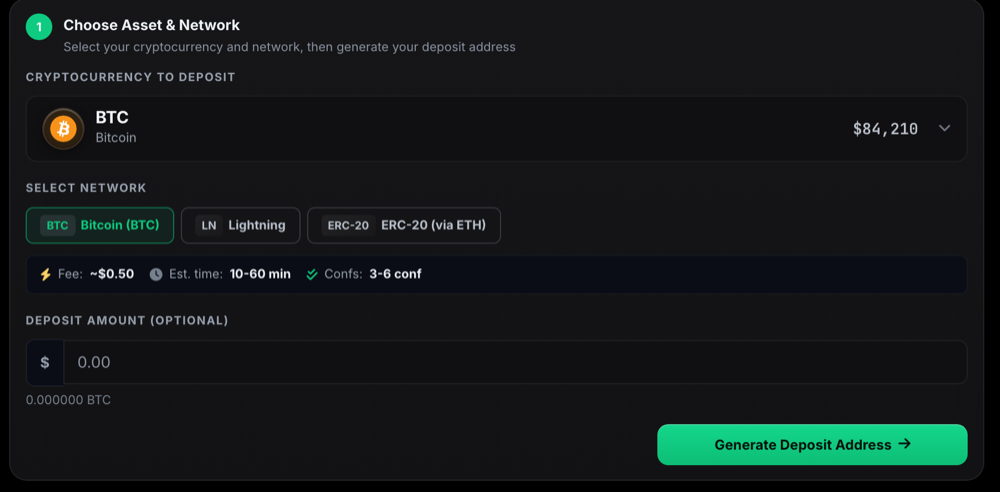
For a crypto deposit, select the coin you want to add and the network to send it over, then press Generate Deposit Address. Send your funds to the address that appears and they will arrive in your Wallet once the network confirms them.

Choosing the cryptocurrency and network, then generating a deposit address on 1 Trade Market

Know your deposit details

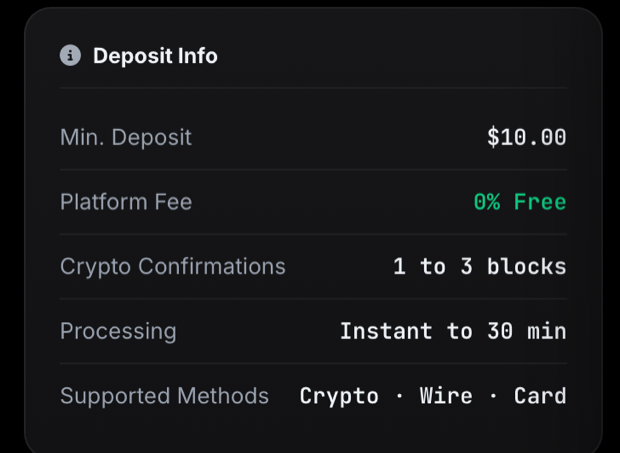
Before you send, check the deposit details next to the form so you know the minimum amount, the fee and how long your deposit will take to arrive.

1 Trade Market deposit details: minimum deposit, platform fee, confirmations and processing time

Last updated